

WorshipScreen: How to Organize a Church Service With Free Presentation Software
A well-organized church presentation can make a service easier to follow for everyone in the room. Worship lyrics help the congregation participate in songs, Bible verses make Scripture easier to read together, sermon slides can highlight important ideas, and announcements ensure that important information is visible instead of being forgotten.
At the same time, managing all these elements can become complicated when every part of a service is prepared in a different program. A volunteer may have to switch between presentation files, text documents, video players, browser tabs, and folders containing images. During a live service, this creates unnecessary technical work.
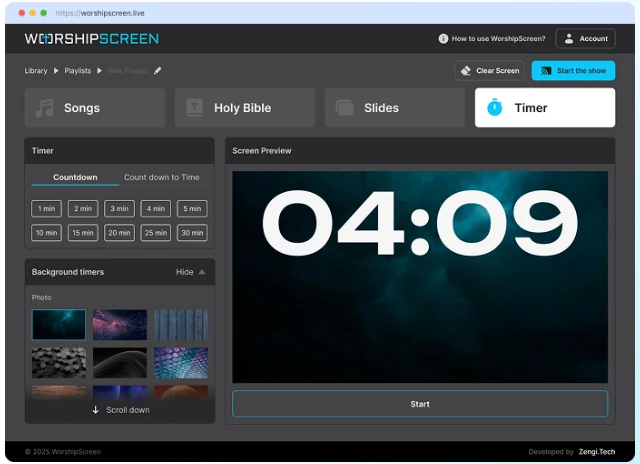
WorshipScreen provides a unified alternative. It is a free browser-based church presentation tool that allows churches to prepare and display worship songs, Bible verses, slides, images, videos, and timers from one place. The platform can be adapted to different church sizes and worship styles, while keeping the basic workflow accessible for volunteers.
What Is WorshipScreen Used For?
WorshipScreen is designed to manage the visual side of a church service. Instead of being limited to one type of presentation, it combines several functions that churches commonly need.
The platform can be used for worship lyrics, Bible passages, announcements, sermon materials, photographs, videos, and countdowns. These elements can be arranged into a playlist that follows the order of the service.
This is particularly useful for churches where the same volunteer or small media team prepares and operates the presentation every week. Once the basic workflow is understood, the team can reuse songs and other content instead of recreating everything from the beginning.
The browser-based design also means that the church does not have to build its entire workflow around one specialized desktop application.
Free Worship Software for Churches
Budget is an important consideration for many churches. A congregation may need presentation functionality but have limited funds for specialized media software.
WorshipScreen offers a free way to organize church presentations.
Churches looking for free worship software can use the platform to prepare lyrics, Scripture, slides, images, videos, and countdowns.
The advantage is not simply that the software is free. It is also that multiple presentation tasks can be managed together.
Instead of keeping one file for songs, another presentation for announcements, and a separate document containing sermon references, the media team can create a single service playlist.
This makes the preparation process easier to repeat from week to week.
Why a Single Presentation Workspace Is Helpful
A church service can move quickly. The worship team may finish one song and immediately begin another. A pastor may ask for a Bible passage. An announcement may need to appear between two parts of the service.
If the operator has to locate every item manually, even simple tasks can become stressful.
A centralized presentation system reduces this problem.
The operator can prepare the service before it begins and place the required material in the expected order. During the service, the task is primarily to follow the playlist and make adjustments when the program changes.
This creates a clear separation between preparation and live operation.
Getting Started With WorshipScreen
The first step is to create an account and open the WorshipScreen workspace.
Before preparing the first complete service, take a few minutes to understand the available sections. Songs, Bible passages, slides, and the timer have different purposes, but they can all contribute to the same presentation.
It is also useful to establish default visual settings.
Choose an easy-to-read font, suitable text size, appropriate alignment, and a background that provides enough contrast. Church presentations are usually viewed from a distance, so readability should be more important than decorative design.
A slide that looks attractive on a laptop may not be easy to read from the back row of a church.
Connect WorshipScreen to a Projector or TV
After preparing the software, connect the computer to the display used by the congregation.
A typical church setup uses a laptop connected to a projector or television through HDMI. If an extended display is available, the operator can keep the controls on the laptop while showing only the presentation on the external screen.
This is a convenient arrangement because the congregation does not need to see the operator's controls.
A compatible television may also be able to display the presentation directly through its browser.
Before the service, test the complete setup. Check the connection, display resolution, text size, videos, and any other media that will be shown.
Create a Reusable Worship Song Library
One of the most useful ways to save time is to build a song library.
Churches often repeat songs from week to week. Recreating the same lyric slides for every service is unnecessary when the content can be saved and reused.
With WorshipScreen, songs can be added to a library and then selected when preparing a new service.
This allows the media team to gradually create a collection of the congregation's commonly used worship songs.
When a song is needed again, the operator can add it to the new playlist rather than rebuilding its lyrics.
If the worship team changes a lyric or discovers a spelling error, the saved song can be edited so that the corrected version is available for future services.
Prepare Song Slides Carefully
Automatically generating slides from lyrics can save time, but the result should always be reviewed.
Songs have different structures. Some include several verses and choruses, while others contain bridges, repeated phrases, or unusual line lengths.
The operator should check where each slide begins and ends.
A good slide should contain enough lyrics for people to follow without becoming overcrowded. Large blocks of text can be difficult to read, especially when the congregation is looking at a screen from a considerable distance.
Line breaks should make sense from a musical and linguistic perspective. The text should be divided naturally rather than simply according to an arbitrary number of characters.
Bible Verses for Sermons and Readings
Bible passages are another important part of church presentation.
When a pastor plans to use specific Scripture references, the media team can prepare them before the service. This means the correct passage is already available when the pastor reaches that part of the sermon.
This is especially useful when a sermon contains several references.
Instead of searching through websites or documents during the live presentation, the operator can select the prepared passage from the playlist.
Preparing Bible verses in advance also reduces the chance of displaying an incorrect reference. The media team has time to check the book, chapter, verse range, and translation before the service begins.
Be Prepared for Unplanned Scripture
Even when a sermon has been prepared carefully, a pastor may mention a passage that was not included in the original presentation plan.
A flexible presentation system should allow the operator to respond.
WorshipScreen can be used with prepared Bible passages while also allowing the media operator to manage additional content as needed.
The important principle is to prepare as much as possible while remaining flexible enough to follow the actual service.
The presentation should support the pastor rather than forcing the pastor to follow a rigid technical script.
Create Slides for Church Announcements
Announcements are often an important part of church communication.
An event may have a date, time, location, registration information, or contact details that people need to remember. Displaying this information visually can make it easier for the congregation to understand and retain.
WorshipScreen can be used to create slides for these announcements and place them in the service playlist.
For example, a church can prepare a slide for an upcoming Bible study, community event, youth meeting, holiday service, or volunteer opportunity.
The design does not need to be complicated. A clear heading, essential information, and an appropriate image are often enough.
Add Images and Videos to the Service
Church presentations can include more than text.
Photographs can be used for announcements, mission reports, community activities, or special events. Videos can be used for introductions, testimonies, educational content, or information about church activities.
WorshipScreen supports image and video content, including YouTube videos.
By placing this media into the same playlist as songs and Scripture, the operator can move between different content types without opening separate applications.
This can make transitions much smoother.
However, every video should be tested before the service. Online content may depend on the quality and stability of the church's internet connection.
Use the Timer Before Worship Begins
The period before a service starts can also benefit from a presentation.
A countdown timer provides a simple way to tell people when the service is about to begin. Instead of displaying an empty screen, the church can show a countdown accompanied by an image, video, or other background.
WorshipScreen provides timer functionality that can be used for this purpose.
A countdown can also help volunteers. If the worship team knows that the timer reaches zero at the planned starting time, everyone has a clear reference point for the beginning of the service.
Build a Playlist for Every Service
After preparing the content, organize it into a playlist.
The playlist should reflect the actual order of the service. A simple example could include:
Pre-service countdown
Welcome
Opening worship song
Additional worship songs
Scripture reading
Church announcements
Sermon Bible passage
Sermon presentation
Closing information
The exact order will depend on the church, but having a defined sequence makes the operator's job easier.
It is also useful to give playlists descriptive names. Including the service type and date makes previous playlists easier to locate.
A previous playlist can then serve as a useful starting point for the next service.
Prepare the Service Before Sunday
A strong presentation workflow begins before the day of worship.
The media team should collect the song list, sermon references, announcement information, images, and videos as early as possible.
Songs should be checked against the version the worship team plans to perform. Scripture references should be verified. Videos should be tested. Announcements should contain current information.
Once everything is ready, create the playlist and arrange it in order.
This approach reduces the amount of work that has to be completed immediately before the congregation arrives.
Test the Actual Display
A presentation should not be considered finished simply because it looks correct on a laptop.
The actual church screen should be tested.
Stand at the back of the room and read the lyrics. Check whether the font is large enough and whether the background provides enough contrast.
Check Bible passages in the same way. If a verse contains several lines, make sure all of them are visible without becoming too small.
Test videos and images as well. Look for problems such as incorrect proportions, unexpected black borders, missing audio, or slow loading.
These checks can prevent technical issues from becoming visible during worship.
How to Operate the Presentation Live
During the service, the operator should pay attention to the people leading worship and preaching.
For songs, slide changes should follow the actual performance. The operator should not advance too quickly or leave an old lyric on the screen after the congregation has moved to the next line.
During sermons, Bible passages should appear when they become relevant.
The operator also needs to recognize that a service can change. If a worship leader repeats a chorus, the presentation should follow that decision. If the pastor spends longer on a passage, there is no reason to rush to the next item simply because it appears next in the playlist.
The playlist provides structure, but the live service determines timing.
Keep the Presentation Simple
More visual effects do not necessarily create a better church presentation.
A congregation needs to read the information quickly. Excessive animation, decorative backgrounds, tiny text, or unnecessary transitions can make that harder.
A simple design with strong contrast, consistent typography, and clear spacing is often more practical.
This is particularly important for worship lyrics and Scripture. The content should remain the main focus.
The same principle applies to announcements. People should be able to understand the important information without having to study a complicated graphic.
WorshipScreen for Methodist Worship Services
Churches from different traditions may use different songs, structures, and presentation styles, but many still need the same basic visual tools.
For congregations searching for methodist worship software, WorshipScreen can provide a centralized way to organize worship lyrics, Scripture readings, sermon references, announcements, and multimedia.
A Methodist church can adapt the platform to its own worship format. Hymns, contemporary songs, Bible readings, sermon slides, event announcements, and videos can all be included in a single service playlist.
The software does not determine the structure of worship. The church decides what content should be displayed and when.
Using WorshipScreen With a Volunteer Team
Many churches depend on volunteers to manage presentation technology.
A good system should therefore be understandable enough that a new volunteer can learn the basics without extensive technical training.
The best way to achieve this is to create a standard process.
One person can prepare the content during the week. Another volunteer can operate the presentation on Sunday. Because songs and other materials are stored in the system, the operator does not necessarily need to know how every item was created.
A church can also create its own checklist covering content preparation, equipment testing, playlist review, and live operation.
A Practical Weekly Checklist
A simple weekly routine can include the following steps:
Confirm the worship song list.
Check and update songs in the library.
Collect sermon Bible references.
Prepare Scripture passages.
Gather announcements and images.
Add required videos.
Create the service playlist.
Put every item in the expected order.
Test the presentation on the church display.
Check text readability from the back of the room.
Verify videos and internet-dependent content.
Start the countdown before the service.
Follow the service carefully during live operation.
This process turns presentation preparation into a repeatable task rather than a last-minute emergency.
Supporting Worship Without Distracting From It
The purpose of church presentation software is not to make technology the focus of worship.
The best presentation is often the one people barely notice because everything appears exactly when it is needed.
The congregation sees the correct lyrics. The Bible passage appears when the pastor references it. An announcement is displayed clearly. A video starts without unnecessary searching. A countdown signals the beginning of the service.
When these things work smoothly, the technology supports the service without competing with it.
WorshipScreen is designed around this practical idea. By combining songs, Bible passages, slides, media, and timers in one browser-based workspace, it gives churches a way to organize their visual content before the service and manage it while the service is happening.
Conclusion
Church presentation software does not need to be complicated to be useful. What matters is that it allows the media team to prepare content, organize it logically, display it clearly, and make changes when the service requires them.
WorshipScreen provides a free and flexible environment for these tasks. Churches can build reusable song libraries, prepare Bible verses for sermons, create announcement slides, add images and videos, use countdowns, and organize everything into service playlists.
The result is a practical workflow that can be repeated every week. Instead of opening several different programs and searching for files while the congregation waits, the media team can prepare the service in advance and focus on following the actual rhythm of worship.
For churches looking for a straightforward browser-based solution for worship presentations, WorshipScreen can serve as a central workspace for the visual elements of the service, from the opening countdown to the final announcement.
